

Stock & branches
Stock you can trust, in every branch.
Stock per branch with bin locations and minimums, transfers that are sent and received, and reports that tell you what to reorder and what has stopped selling.
- ZATCA Phase 2 e-invoicing
- Data kept in Saudi Arabia
- Arabic and English
Why it matters
When the system and the shelf disagree, you lose sales and tie up cash in parts nobody buys. Ktuulz moves stock only through posted documents, so every change on the shelf has a document, a date and a name behind it.
Stock per branch, with bin location
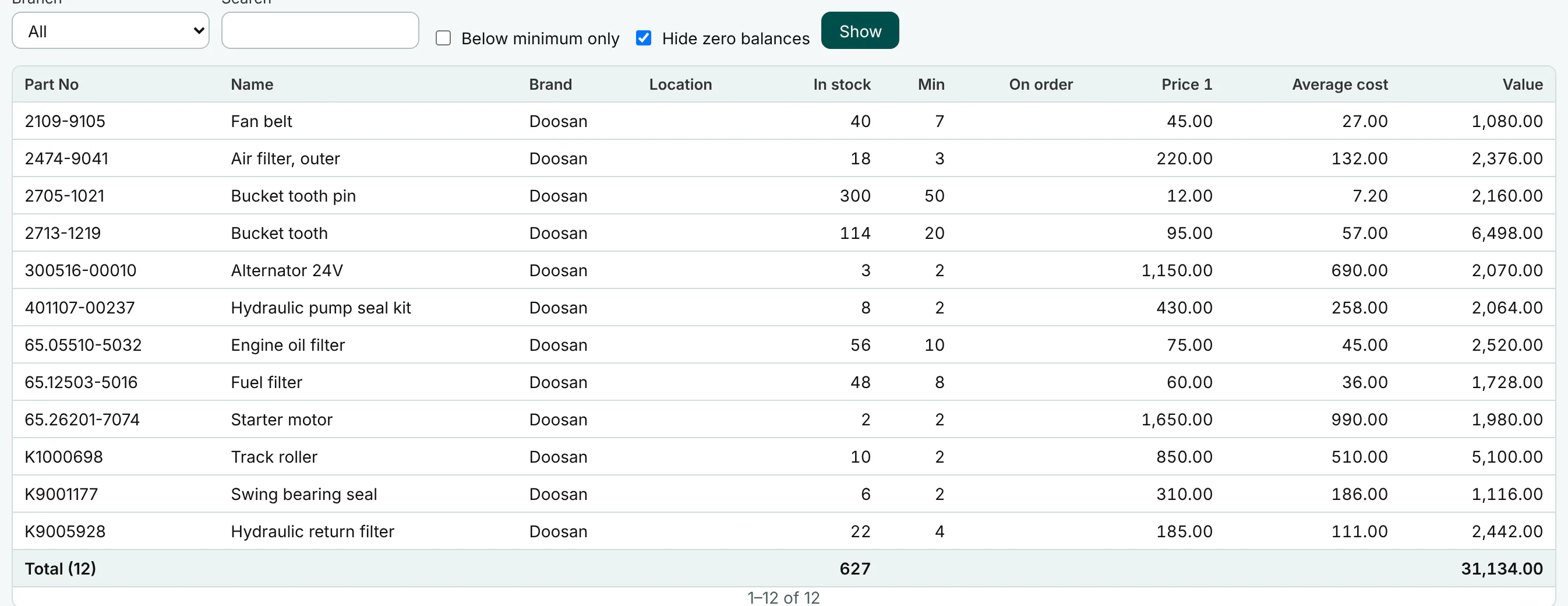
Each part has its quantity, bin location, minimum and maximum in each branch. The part search shows the stock here and in every other branch, so the counter can offer a part from another branch instead of losing the sale.
Transfers in two steps
One branch sends, the other receives. Goods on the road are neither counted twice nor lost, and each step records who did it.
Reorder and slow-moving reports
Reorder suggestions list what has fallen below its minimum. The slow-moving report shows what has stopped selling, and items below cost shows parts priced under what they cost you. The owner’s Home flags parts below minimum and negative stock per branch.
Average cost and stock value
Every purchase updates the part’s weighted average cost, with freight and customs spread into it. The part’s page shows its stock value for all branches and for this branch, to users allowed to see costs.
Load thousands of parts at once
Import parts from a CSV file or cells pasted from Excel, with Arabic or English column names: names, brand, numbers, three prices, VAT category, minimums and opening quantity per branch. Every row is checked before anything is saved, problems are listed by row and column, and loading the same file again changes nothing.
All features
Everything in Stock & branches
- Stock per branch with bin location, minimum and maximum
- Transfers between branches: send, then receive
- Stock adjustments and opening stock, draft then post
- Weighted average cost, updated by every purchase
- Three price levels, and packing units with conversion factors
- Brand, category and product line on each part
- Stock levels and value, and an item movement card
- Reorder suggestions, slow-moving stock, items below cost
- Import parts from CSV or Excel, checked row by row first
- Long lists in pages with totals; Excel exports always complete
Works with
Connected to the rest of the shop.
Parts search & catalogue
Find the right part however the number is typed, even for a machine you only know by its serial.
Purchasing
Buy from local and overseas suppliers, with the landed cost worked into every part.
Sales & counter
Serve the customer in front of you in seconds, and print a clean bilingual invoice.
Accounts & VAT
Books that keep themselves, and a VAT return laid out like ZATCA’s form.
Questions
Questions about Stock & branches
Can one branch see another branch’s stock?
Yes. The part search and the part’s page show the stock in every branch, so the counter can offer it or ask for a transfer.
How is stock valued?
At weighted average cost per part. Purchases update it, freight and customs are spread into it, and each sale takes its cost from it, so margins and the stock value include the landed cost.
Our parts are in a big spreadsheet. Can we load them?
Yes. Import parts from CSV or Excel checks every row first and lists any problems by row and column before anything is saved. We test it with 100,000 parts.
Can stock change without a document?
No. Stock moves only through posted documents: purchases, sales, returns, transfers and adjustments. Each one appears on the item movement card with its date and number.
See it with your own parts.
Start a free trial, or email us first. We answer in Arabic or English.
- ZATCA Phase 2 e-invoicing
- Data kept in Saudi Arabia
- Arabic and English
- contact@ktuulz.com